Zephras Collector
A free WoW Forever addon, version 1.5.1, that records what you discover while you play and links anything you hover to its zephras.com page.
The Uploader installs the addon and keeps it up to date. What each version changed is in the file's changelog on CurseForge.
Quick links to zephras.com
Hover an item, spell, NPC, or quest and press Ctrl+C, or right-click the minimap button for your target. A small box opens with that record's zephras.com address, ready to copy into your browser.

- Where it works: tooltips, the quest log, the quest tracker, the quest window an NPC opens, the reputation list, mounts, toys, buffs, tracked recipes, and links clicked in chat.
- Put in chat: the box's "Put in chat" button (or Shift+Enter) puts the name and link into your chat box; you choose whether to send it.
- Your own key: change Ctrl+C under Key Bindings, "Zephras".
What it records while you play
Nothing to set up and nothing to click: no pop-ups, no chat messages, and no change to your interface.
- NPCs you target, and where they stand.
- Quests you pick up and turn in, with the experience, money, and reputation they paid.
- Loot from corpses, chests, herbs, veins, and fishing.
- Vendors, trainers, and flight masters you open.
- Boss fights: which dungeon or raid boss a fight was, so each boss on a dungeon page links to its own page with what it drops.
- Gathering skill: your skill level, skill-ups, and failed attempts when you skin, pick herbs, or mine, so the site can show what each skill level needs and yields.
- Quests nobody has met yet (from version 1.5.0): while you stand still out of combat, outside dungeons, and off flight paths, it asks the game server about one quest every few seconds from a list of quests Zephras has no text for, at most 200 per session. The game keeps the answers in its quest cache, which the uploader shares unless you turn that off. To stop it, untick "Ask for quests Zephras lacks while I stand still" in the Zephras panel.
The Zephras panel
The first time you log in with the addon, a short welcome window explains how your discoveries reach zephras.com. The panel's "How to upload" button shows it again.
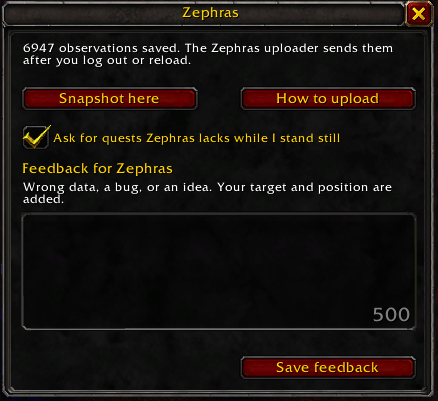
Click the minimap button (the Zephras mark) or type /zephras for a small panel with a snapshot button, "How to upload", the quest-asking checkbox (from 1.5.0), and a feedback box. Feedback is saved with your data and reaches the Zephras team with your next upload. Drag the minimap button to move it around the minimap; it stays where you put it.
How your data reaches the site
- Log out or type /reload: the game saves what the addon recorded.
- Upload the save on the upload page, or let the Zephras Uploader for Windows, Mac, and Linux send it after you log out.
- Every upload is checked automatically. Your first upload and anything the checks question wait for a reviewer; after that, clean uploads are accepted automatically. Accepted is not yet published: a record appears at the next morning's update once a trusted player or two players agree.
What it never records
- Your character's name or anyone else's.
- Anything the game hides from addons: such values are skipped, never stored.
- Player chat or whispers (only lines NPCs say), or anything personal.
Light on your game: it reads what the game already shows you, asks the server about one quest at a time only while you stand still, writes a few small rows as you play, and keeps its save file under 3.4 MB. More in the privacy notice.
Help
Ask in #collector-help on the Zephras Discord, use the feedback page, or write to admin@zephras.com.